Credit Management Release to Warehouse Credit Hold Loop

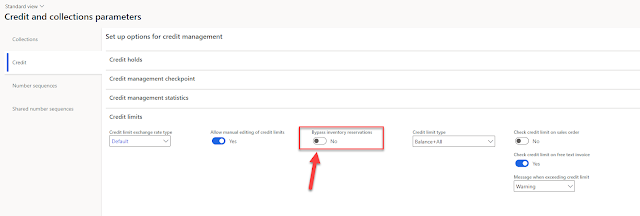
Some big changes were made to Credit management in recent versions that need to be addressed. One of which is the following parameter: 

Bypass inventory reservations


Image of Credit and collections parameters with Bypass inventory reservations highlighted
A new parameter has appeared called Bypass inventory reservations, but what does it mean?

IT☕ Time Podcast

One of the things I have recently been working on is a podcast that is by women and geared toward tech topics. The podcast is called IT🍵 Time. It's a collaborative effort with Zoe Abulzahab and Yuanming Chu, both of whom I work with at Alpha Variance Solutions. 

We are always looking for interesting speakers and topics, so if you have any ideas, feel free to add a comment to this blog post. Thanks for listening! 

Set up Collections Agents and Customer Pools

When setting up the Credit and collections module in your D365 Finance environment, you will want to ensure that your collections team will have access to work with their assigned customers. Logging in and seeing all of the Customers with all of their information can be an overwhelming experience, making it more difficult for your collections team to do their job. D365 Finance allows for the creation of Collections agents with the ability to filter only assigned information.

Using "Old" AX filtering techniques in D365FO

When I worked daily in AX 2012, filtering became my best friend. I appreciated the "Ctrl + g" grid filtering header that opened on all of my forms and allowed me to search my data by using all of the great filter and query options listed in the article below:

https://docs.microsoft.com/en-us/dynamicsax-2012/appuser-itpro/advanced-filtering-and-query-options

Looking for a Customer that starts with G, ends with V, and is not Gustav? Sure thing!

Error: Production order ***** could not be scheduled. Not enough capacity could be found.

Ah, the good old capacity error. "Production order ***** could not be scheduled. Not enough capacity could be found."

There are a few main culprits for this error. 

New feature: Enable batch processing for bank payment advice reports

One of the pain points in AX/F&O was that you could not set up batch processing for your Payment advice reports. 

In late 2019/early 2020, a new feature was added called "Enable batch processing for bank payment advice reports." 

The description reads as follows:

This feature lets you use batch processing for both the customer and vendor bank payment advice reports. To use this feature you must use BankPaymAdviceVendV2 and BankPaymAdviceCustV2 bank payment advice, and set them up as the customer and vendor report formats in print management.

How do we set this up and use this functionality? In our example today, we will look at this from an Accounts payable/Vendor perspective. 


Credit Management - Automatic Credit Limits

When creating Automatic credit limits, you can create a set of rules that will take specific criteria into account while quickly and easily applying credit limits. Navigate to Credit and collections > Setup > Risk > Automatic credit limits to begin. 


Automatic Credit Limits

When defining Automatic credit limits, you will use the Scoring groups that were created for Risk scores.